How to Dry Out a Wet Laptop

repair wet laptop

repair wet laptopI am lucky enough to have a spare laptop, but also stupid enough to leave it in the garage the other day, over the space of the weekend it rained, hard for about 3 days solid and when i looked back in the garage to my horror the garage roof was leaking at the laptop was soaking wet, the lid has been left open so it had no protection, there was water steadily dripping onto the keyboard for several days!

I picked the laptop up and when i tilted it on its side water poured out the end in large quantities, my initial thoughts were to put it straight in the bin, but i then realised i had nothing to loose, i quickly popped out all the things that came out easily, the DVD drive is a removable type, the battery, memory and hard drive also came out with just 2 screws.

I then left the laptop on an inside radiator for 10days, rotating every few days. To my amazement when i put the battery in and pressed the button it worked, no damage done at all!

So, if you give your laptop a dunking maybe, all is not lost!

Synchronizing Andriod 2.1 (or higher) with Microsoft Exchange

andriodSynchronizing Andriod 2.1 (or higher) with Microsoft Exchange

Please note that I did these notes using my HTC Desire but the setup steps are very similar with all Andriod phones. 

Also you can only add one Microsoft Exchange account on your phone and you can only sync with Microsoft Exchange Server 2003 Service Pack 2 (SP2) or later.

  • From the Home screen, press MENU, and then tap Settings > Accounts & sync.
  • Tap Add account > Exchange ActiveSync.
  • Enter the Exchange ActiveSync account details, and then tap Next. Your Exchange Server must support auto-detect for the phone to automatically set up the Exchange ActiveSync account. If your Exchange Server does not support auto-detect, you will need to enter your Exchange Server settings after you tap Next. Ask your Exchange Server administrator for details (you will need you local domain name, server name and user account details.)
  • Select the types of information you want to synchronize, and then tap Finish setup.

Windows 7 Phone Setup Email with Exchange

So you get a new Windows 7 phone and whats the first thing you want to do, setup your email of course:-

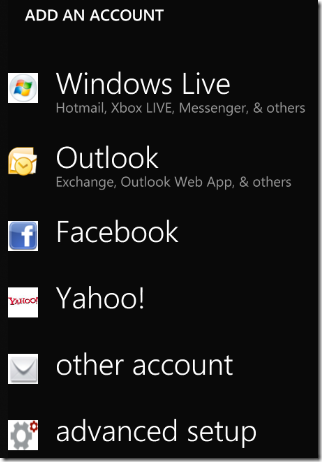
Goto “Mail Setup” in the menu:-

windows 7 phone mail setup

The “Outlook” option will only work if you have the very latest version of Exchange server, so you need to choose “advanced setup” which allows you to enter the settings manually:-

Windows 7 Phone Add Account

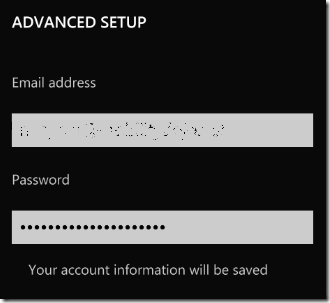
Enter your email address and password:-

Windows 7 Phone Email Address

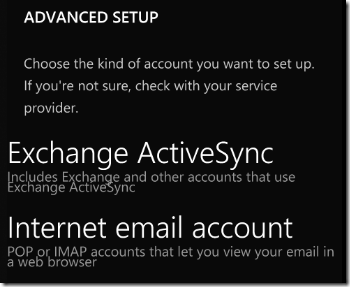
You then need to select the type of account, select, “Exchange ActiveSync”

Windows 7 ActiveSync

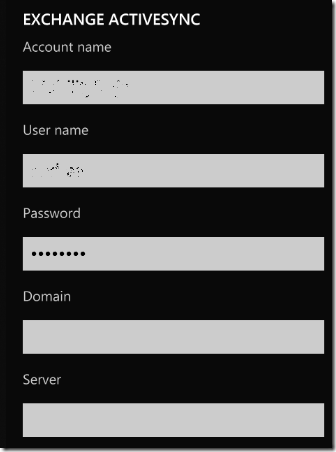
You then need to add an account name, anything will will do for the account name “work email” perhaps.

Windows 7 Phone Activesync Settings

Enter your server address and domain name, then finally select the options you want on the last screen:-

Windows 7 Phone Active Sync Options

Backup your Data Online for Free

I still see people every week loosing important data, ranging from crucial word documents to personal emails, photos and music, there is now many on-line backup services, that allow you to install a simple piece of software on your machine and backup your files to the internet, it is not really suited for large business backups, but perfect for home users to quickly setup, my favourite is SugarSync it gives you 5gb of free online storage and is simple to use.
Follow the link above, sign up now and start backing up your data!