Adding a Signature in Outlook Web Access 2007

Once logged into your Outlook Web Access, click on ‘Options’ in the top-right hand corner of the page.

This will give you the following screen –

Put a check mark in ‘Automatically include my signature on outgoing messages.’

Click Save towards the top of the screen.

How to disable write caching to disk in Windows XP

Windows 7 Image

To Disable write caching to disk , follow these simple instructions

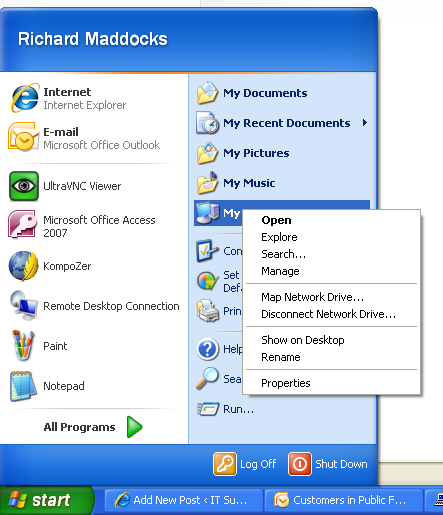
1) go to start menu, right click my computer and select properties
Start-right click my comp.

2) you will get a dialog box, select the hardware tab then the device manager button.
system properties

3) expand the “Disk Drive” Category, and select properties.
Disk Drive Properties

4)Select the policies tab
Policies Tab

5)untick “enable write caching on the disk” then reboot your machine.

Asus Tablet, iPad Alternative Released Soon

Asus EP90 Review

Asus EP90 ReviewAsus have announced this week that they joining the craze being set by giants like Apple, HTC and many more, By developing there own tablet for release this year.

Although Asus haven’t yet given a release date they have said it will be out this year, and like many of the tablets currently available on the market the “ASUS EP90” has features like :

10.1-inch WSVGA IPS With Toughened Glass – For Extra Durability
Up to 8 hours Battery Life
2 Cameras 1 on the front and 1 on the back
Wireless : 802.11b/g/n
Bluetooth v2.1 + EDR
Android 3.0 (Honeycomb) Platform
and much more

But the real question is how will it compare with the iPad?

Well the processor on the iPad is Dual Core, but sadly the processor within the EP90 is not Dual Core.

The iPad comes with a 3G Option (Extra Cost) and there is no 3G option on the EP90.

The battery Life of the EP90 is as much as 2 hours less than that of its Apple Counterpart

Using RDP in Windows XP

remote desktop

The RDP client is built into Windows XP and is simple to use:-

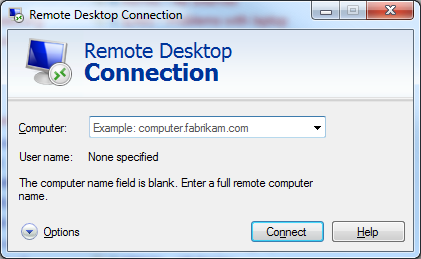
Click Start => All Programs => Accessories => Communications => Remote Desktop Connection

Then simply enter the server address you have been given.


***ADVANCED USER TIP – Tou can also start the RDP client directly by typing mstsc.exe into the “run” box.


remote desktop

Ask an Expert: Windows 7 Sims and Themes

Richard asks…

does the sims 3 original work on windows 7?

So I bought the original sims 3 and it won’t install into my laptop. I have a windows 7 and It won’t install ): So I’m trying EVERYTHING lol I bought this one –> http://firsthour.net/screenshots/sims-3/sims-3-cover.jpg

lol like omggg , I want to play this so badly rofl but I don’t think I have anything else to do. The box says that for PC’s it can be used in : windows xp SP2 or Windows SP1. Nothing about Windows 7 ): So, I feel like I freaking wasted $50 for NOTHING lol and I can’t return it because I have already opened it. Damn it :

Please help and don’t be rude about it because honestly if you’re here to critize , kiss my mo’ friggin’ ass -__-
Please help me :
Pleaaseee give me some advice on how to make it work lol

Matt NJ answers:

I have Windows 7 and it works perfectly fine.

I have
-The Sims 3
-The Sims 3 Ambitions

Both work really well.

Maria asks…

What’s wrong with my windows 7 theme thingey?!?

I am so annoyed right now.
Earlier When I went to the task manager I accidentally clicked something wierd and now my whole windows 7 setup is like retarded.
I can’t exactly explain what’s wrong but here are some screenshots:
http://i33.tinypic.com/swef12.png
http://i38.tinypic.com/208f8ua.png

Basically I don’t know how to change it back to how its supposed to be. Where i am able to change the colors and when I click a running program at the bottom its actually gives you a preview of the windows that are up

Matt NJ answers:

I think you kill the the desktop Windows manager process and it switch to an non aero theme. Try click on the anyone of the aero theme below in the first pic and then configure it to your preference. If it still doesn’t work then restart Windows and it should come up with the aero look

Powered by Yahoo! Answers

Ask an Expert: Windows Phone 7

George asks…

How Do I Update My iPAQ h5450 To Windows Mobile 6 or 7?

My OS for my IPAQ h5450 is Windows Mobile 2003. I would like to change the OS to WINDOWS MOBILE 6 or 7

Matt NJ answers:

Unfortunately, you cannot.
The hardware required to run Windows Mobile 5/6 has higher requirements than Pocket PCs designed to run Windows Mobile 2003.

On top of this, without a cooked ROM package specifically designed for your PPC, you would be left without driver support, leaving your touchscreen, microphone, wifi radio, etc. useless.

*Note: Windows Mobile 7 is not set to release until 2010, and will certainly not be compatible with your iPAQ.

Sorry for the bad news.
Hope this helped…

James asks…

Windows Mobile 7 Upgrade?

I have the HTC HD2 running (among other things) Windows Mobile 6.5. Will I be able to upgrade to Windows Mobile 7 when it comes out?

Matt NJ answers:

First of all, it’s Windows Phone 7 ;).

Secondly, unfortunately you won’t be able to upgrade to Windows Phone 7.

Charles asks…

I want to install windows 7 in my mobile?

while i was travellig in bus i saw a guy wiht a mobile .. he was having windows 7 in his mobile. i want to install it too pls someboidy tell me.

Matt NJ answers:

You cannot install windows on any phone, only windows mobile phones. They come with a mobile version of windows preinstalled, and are designed to run it.
http://www.microsoft.com/windowsmobile/en-us/default.mspx.

Paul asks…

NEXUS ONE or WINDOWS MOBILE 7?

hey guys google new phone has been released…
but it still lacks a lot of feature that people were expecting for it

so I am thinking it would be wise to wait for WINDOWS MOBILE 7

what do you think guys?

Matt NJ answers:

I am a huge windows mobile fan. Windows mobile is way more customizable than droid

Richard asks…

Will Windows Mobile 7 be a free upgrade to Windows Mobile 6.1/6.5?

If I buy an HTC Touch HD which has Windows Mobile 6 on it. Will Windows Mobile 7 be a free upgrade (or if it costs, how much roughly)? WIll it work on the HTC Touch HD?

Also, when is it due for release?

Thanks

Matt NJ answers:

yes it will be free via software update and there is no definite release date yet but it will be sometime in 2009

Powered by Yahoo! Answers

Ask an Expert: Vidoes and YouTube

Mark asks…

how can i download a video from youtube onto a usb?

Is there any way to download a video of yourtube onto a usb that a computer without internet should be able to open and be watched?

Matt NJ answers:

Yeah, you can use YouTube Downloader Suite, which can help you diwnload and convert youtube videos, then you can export the downloaded videos onto your usb, and you will be able to watch them on your computer.

The link is:
http://www.free-download-youtube.com/youtube-downloader-converter.html

Thomas asks…

How to increase views on my Youtube video Tutorial?

here is my video

http://www.youtube.com/watch?v=YpnXzufpgfA

its about a site where you can download the latest MOVIES for free

Matt NJ answers:

Well posting the link here is one way to get more views, but honestly, your video, even before looking at it, sounds like Spam and will be a hard sell as a legitimate infomercial or a tutorial.

Maria asks…

How do I import MP4 to iMovie?

So i downloaded an MP4 (not mpeg4, or whatever), and i need to edit it on imovie.
itll show it importing, but it wont show up. it opens in quicktime (i don’t have pro)

i have imovie07.
what do i do? i can’t download any extra programs or software or anything because this isn’t my computer.

Matt NJ answers:

According Apple official website, iMovie (including iMovie ’11/’09/’08) can only import DV, MPEG-4, MPEG-2, MOV and M4V.

Though the MP4 file format defines the storage of MPEG-4 audio, scenes and multimedia content using the ISO Base Media File Format, the MP4 file may also contain any number of audio, video, and even subtitle streams. So it is impossible for the MP4 file to determine the type of streams in an MPEG-4 file based on its filename extension alone.

Therefore, you may have some clues that your downloaded MP4 (not MPEG-4) can not shown up on iMovie

if you wanna to import mp4 to imovie, you have no choice but to use extra program or software to convert your mp4 to imovie compatible mpeg-4 format

the following is a step by step guide on how to successfully import mp4 to imovie

http://www.bigasoft.com/articles/how-to-import-mp4-into-imovie.html?xyh

i also use imovie 07 and have tried the above guide, and the software in this guide is safe to use

since the computer is not yours, why not uninstall the software after the conversion.

Sandra asks…

how to get software for a camcorder?

i have a sampsung camcorder well its my moms ~ anyways the software disc is lost and now we cant put anything on the computer ~
im wondering if i could download a software or what i have to do ? please help

Matt NJ answers:

Movie Maker comes with Windows. Look to see if you have it. You can always go to the Samsung support site to download software for the camera. That’d be my choice.

Joseph asks…

How do I get my music from my Ipod to my new Itunes.?

I recently had to hard reset my computer, cleaning out the entire drive. I downloaded Itunes again and tried syncing my Ipod but it said all my music will be deleted, I mostly have non purchased music from various CDs. Someone please help!

Matt NJ answers:

Many iPod users have asked this.
It won’t be a problem if you use this iPod to iPod/Computer/iTunes Transfer.
It automatically transfers your iPod and iPhone music, video, playlist to computer and iTunes. Backup all your music and video in a couple of clicks. Really makes music and videos sharing pretty simple and enjoyable. Wish this can help and good luck.

I think its step by step guide is most helpful.
http://iphone-to-computer.net/transfer-songs-videos-photos-playlists-from-ipod-to-computer-itunes.html

It is easy to use and you can try it now.

Powered by Yahoo! Answers

OWA Send Message Gives Forbidden Message

Resetting Internet Explorer 8

This happens when the directory permissions are incorrect in IIS, the quickest way to reset them is as follows:-owa forbidden sending

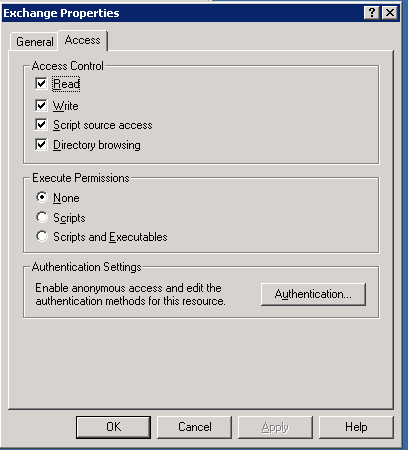
In the Exchange System Manager Console, expanded: servers/protocols/http . Then right click the “exchange” virtual directory and choose properties. Click the access tab at the top and then uncheck directory browsing.
Click apply and OK. Then go back and re-check the directory browsing box. Apply and OK and it should work.

Samsung Galaxy Tab vs iPad Differences

samsung galaxy tab

So which to buy, the 7″ Galaxy Tab running Android, or the 10″ iPad, here is a quick guide to the differences:-samsung galaxy tab

Size, Weight and Display:

iPad 242x189x13.4mm and 680g – Screen 10″ and 768*1024

Galaxy Tab 190x120x11.9mm x 380g – Screen 7″ and 600*1024

Verdict:-

If you are traveliing, then the smaller and lighter (half the weight!) Smasung Galaxy Tab has to be the winner, if you need a larger screen, go for the iPad.

Connectivity:

Most people go for the standard WiFi only iPad, the 3g ones are just too expensive, here is a list of the extra connectivity things the Samsung does that the iPad doesn’t, makes phone calls, sends SMS and MMS, has Bluetooth 3.0 connectivity and HSDPA (7.2mbps internet via a SIM card) oh and finally a GPS receiver.

Verdict:-

No competiton here, the Samsung Galaxy has everything missing from the iPad (plus a camera)

Storage:-

The iPad has no expansion slots so you have to choose 16,32 or 64gb when you purchase one, the Galaxy tab allows you to add a Micro SD Card, so you can add cards of upto 32gb as you need, making the standard model have 48gb of space with a card.

Verdict:-

Again the iPad loosing out offering no options or flexibility.

Battery Life

iPad 10hours, Samsung 7hours.

Verdict:-

the iPad wins here, but that isnt surprising as it is twice the weight, a much beefier battery lurks under the cover.

Camera

Simple, the iPad doesnt have one, the Galaxy has 2 (front and rear for vidoe calling), and a flash.

Performance and Useability

In terms of processor the 2 machines are very similar with 1ghz processors, the Samsung has double the RAM at 512mb vs 256mb on the iPad.

Operating systems are similar in design and features, the App store for apple is way ahead with 250,000 apps although nothing like this number are for the iPad, most are for the iPhone. The android market place is currently running at around 70,000 apps and also crucially supports Flash Player 10.1, again lacking in the iPad.

Verdict:-

Difficult one here, think this one is a draw.

Overall Thoughts:

I have now owned both, and for me the Galaxy Tab is a clear winner, it does everything and more the iPad did, after owning an iPad for 3 months, i made a list of the things i needed in a new tablet, a built in sim card for data roaming, sms features, gps postioning, flash player support, memory card support, a bit smaller (i found the iPad a bit big to carry around on the train) and finally a camera. The Samsung Galaxy Tab does all that.

I ruled out the Galaxy tab as I could not find one for less that £450, having found one for £330, for me there really is only 1 machine to have!


iPad / iTunes Required file cannot be found when syncing

I recently came accross this error when trying to sync photos to my ipad.  After some research I found that the problem is to do with the ipod photo cache.

The following fixed the error;

PC
Close iTunes
Go to your My Pictures or Pictures folder
Delete the folder called “ipod photo cache”
Repen itunes and sync your iPad
The ipod photo cache should then rebuild.

MAC
Close iTunes
Go to your home folder in finder.
Open your pictures folder.
Right click on iphoto library and click on show package contents.
Find “ipod photo cache” file and delete it.
Close finder.
Reopen itunes and you sync iPad
The ipod photo cache should then rebuild.