Backup to a network share with Time Machine

time-machine-icon

Time machine is a new feature in Leopard that backs up your data but by default it only supports backing up to another physically attached hard drive.  There is however a work around to get it to backup to network shares;

  • Go into Applications / Utilities and open terminal
  • Type in defaults write com.apple.systempreferences TMShowUnsupportedNetworkVolumes 1 and then press enter
  • Mount the network share (cmd + k)
  • Go to System Preferences, open Time Machine and select change disk
  • Then select the share that you want to backup to and Time Machine should then backup to it

Find the Microsoft Outlook Temporary folder

We often get calls from customers saying that they have worked on an attachment in Outlook and saved it but are not able to find it again.  This is because Outlook saves attachments to a temporary folder on your computer which is hidden.

We also get calls saying that Outlook is running very slowly or that they are unable to open certain attachments within Outlook.  This is normally down to the fact that the Outlook temporary folder has a lot of files within in and needs clearing out.

To find the location of the Outlook Temporary folder you need to do the following;

Open the Windows registry using regedit.exe and then browse to the following location depending on the version of office you have;

Outlook 2000 HKEY_CURRENT_USER Software Microsoft Office9.0 Outlook Security
Outlook 2002/XP HKEY_CURRENT_USER Software Microsoft Office10.0 Outlook Security
Outlook 2003 HKEY_CURRENT_USER Software Microsoft Office11.0 Outlook Security
Outlook 2007 HKEY_CURRENT_USER Software Microsoft Office12.0 Outlook Security
Outlook 2010 HKEY_CURRENT_USER Software Microsoft Office14.0 Outlook Security

Once there you need to open the value called OutlookSecureTempFolder to find the folder location.

The easiest way to browse to this folder is to simply copy this path and paste it into either into start and run (in Windows XP) or start and search (in Vista or Windows 7.)

Now that you can access this folder you can either get the attachments your need or delete the content to clear out the folder.

Setup POP3 on iPad

iPad Review

here is a quick guide on setting up POP3 on your iPad:-

  • From the iPad Home screen, tap Settings.
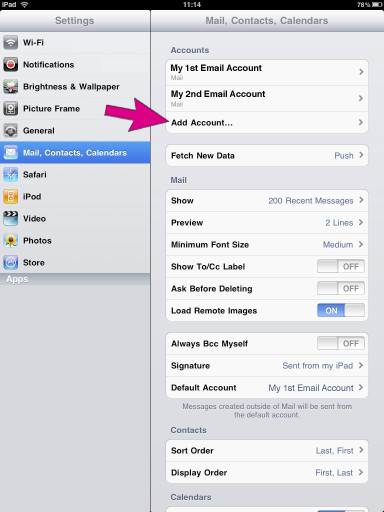
  • Tap “Mail, Contacts, Calendars,” then tap Add Account.
  • Setup POP3 on iPad

  • Tap an account type, then choose “Other”
  • Setup POP3 iPad

  • Enter your account information and tap Save.
  • Setup POP3 iPad

  • Fill in the Incoming Mail Server and Outgoing Mail Server settings.
  • Setup POP3 iPad

  • Thats it, done!
  • iPad Harbour Master Angry Birds Alternative Best Game

    harbour master

    harbour masterWhilst everyone is raving about the Angry Birds game on the iPad, the lesser known Harbour Master seems to have been left by the wayside.  This simple, intuitive game is highly addictive and a fanstatic way to de-stress after a hectic day.  The aim of the game is to dock ships that enter the harbour carrying cargo.  There is purple cargo that must unload at specified docks and orange cargo that is destined for different docks within the harbour.  At first this seems an easy, agreeable task but as more ships enter the fray, docking the vessels becomes more of an ordeal.  As the player becomes more accomplished, the boats move faster and more of them cruise on to the screen.  For those who feel in the mood for an even greater challenge, there is the option to speed them up even more by pressing an icon on the top, right-hand side of the screen! Even by mastering the dock which unloads cargo more quickly than the others, it is still imperative to re-route ships to avoid the deadly collision which will promply end the game.

    Whats The Difference Between iPad and iPad 2

    A quick summary on the differences between the iPad and the iPad2:-

    Size and Weight:

    the iPad 2 is around 2/3 rds of the thickness of the iPad, and 88 percent of its weight  You’ll notice the difference right away. This is a thinner, lighter device.

    Price:

    Although not officially confirmed, the iPad 2 will be the same price as the iPad.

    Performance:

    Double the RAM (256mb increased to 512MB) a dual core processor which makes it significanly faster to run apps and the graphics performance is according to Apple “is as much as nine times faster than on the original iPad” From the moment you pick it up, it is faster and more snappy to load and do the things you ask of it.

    New Camera:

    The iPad 2 gets a couple of cameras, front and back, ready for video conferencing.

    Case:

    The new smaller, rounded case means unfortunately that your iPad case and stands probably won’t fit the new model.

    Screen:

    The Screen remains the same on the new model.

    Battery:

    The 10hour battery life remains in tact!

    Ask an Expert: Windows Shutdown Command

    Matt NJ

    William asks…

    What command Prompt can make a windows computer shutdown at a time of day?

    i know how to make it a countdown (shutdown -s -t 60) but how can i make it so i can input a time of day it shutdowns

    Matt NJ answers:

    check the below link

    http://www.windows-commandline.com/2009/04/schedule-shutdown-from-command-line.html

    Sharon asks…

    How to shutdown another computer on the same network using command prompt on windows vista?

    When i went into command prompt and did the shutdown -i as soon as i hit browse a window popped up saying “The Active Directory Domain Services is currently unavailable.”

    Matt NJ answers:

    Use the remote shutdown tool.

    Shutdown

    Or type Shutdown with no switches to get help, or see this post:-

    https://www.itsupportsussex.co.uk/blog/2011/free-shutdown-command-line-tool-power-save/

    Steven asks…

    is the command (shutdown -a) is the same for windows XP and vista?

    Matt NJ answers:

    Yes it is.

    Robert asks…

    Access denied on Windows 7 command prompt remote shutdown?

    Ok so i have two laptops. And i just got them for my birthday and im trying ti figure out all the cool little things i can do with them and im pretty intrigued by the command prompt and what it can do. One of the things im trying to figure out is the remote shutdown. So with one laptop i went to the command prompt and put in… shutdown /r /m computername.
    And instead of computername i put both the acutall written computers name and i tried the ip address. When i had finished and pressed enter it said access is denied .
    I dont know what this means and how do i get past it?
    nooonoo its not for malicious or bad intent. Its just to connect both my laptops to their full potential whether thats from remote shutdowns when its upstairs and im downstairs with the other or file sharing. I did what you said and had it run under administrator but it still said access denied. is there anything i have to do with the other computer or this one?

    Matt NJ answers:

    Most computer firewalls will block a remote shutdown because it can indeed be malicious! If you don’t have the firewalls set to accept such commands they simply will respond with “access denied” messages. Basically the other machine is telling you it will not do what you ask.

    Powered by Yahoo! Answers

    Ask an Expert: iPad Questions

    Matt NJ

    William asks…

    Is Quicken software (money management) compatible with the iPad?

    Can the iPad run any programs that work on a mac?

    Matt NJ answers:

    No, the iPad can only run apps made for iPad (or iPhone/iPod Touch). So unless a Mac app was re-done as an iPad app, it won’t work.

    Quicken is not available for iPad, but here’s a list of some other finance apps that do work:
    http://financialsoft.about.com/od/pdasoftware/tp/iPhone_Apps_Personal_Finance.htm

    Lisa asks…

    How do I transfer or copy or convert files to my iPad?

    I just bought iPad, but I found iTunes is very difficult to manage files for my iPad, I am not sure if there is any more file management software around for iPad or my iPhone…

    Matt NJ answers:

    Try iPad manager from http://www.ipad-manager.com/ipad_manager__-23-software.html , iPad manager saved me a load of time when doing file exporting and importing, it even able to convert files into ipad format before importing to iPad…


    Helen asks…

    Is an iPad worth buying?

    Hi 🙂
    I am a college student and am thinking about buying an iPad recently. However, I am not sure if it is a good idea. I already have a laptop (that works..technically) and can definitely survive without an iPad. But I like it a lot and think that it may be easier to carry around (I move around quite a bit) and store/retrieve information from. (Plus, it will help save the environment if I use it instead of paper 😛 (joking)).
    Another issue is that I am guessing that the apps will probably cost more than the device itself if I want it to efficiently replace my laptop (with the need to write essays, time management, etc.).
    I would truly appreciate your feedback (especially if you had bought the device,etc) and thank you for your time. 🙂

    Matt NJ answers:

    Its a giant ipod touch.

    It cant really be used like a regular laptop, they are different things, ready my 5 minute review here:-

    https://www.itsupportsussex.co.uk/blog/2011/5-minute-review-of-the-ipad/

    Powered by Yahoo! Answers

    Outlook Autoprompt, NK2 File, Deleting Entries

    We often receive calls saying that users emails addresses are wrong, or spelt incorrectly and they keep showing up in Outlook; it usually turns out to be just the auto prompt feature of Outlook remembering an old invalid address, here is a short video on how to delete it:-

    1) start typing the first few letters of the address you think is wrong

    2) use the up and down keys on the keyboard to highlight the entry you want to delete

    3) press the “delete” key on your keyboard…

    4) DONE: you will not see that address in the list anymore!

    Hitachi CP-X440 Projector Reset Filter Hours

    hitachi-cp-x440-filter-reset

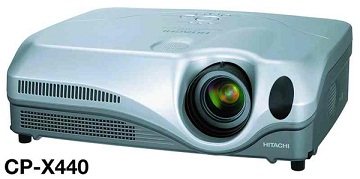
    hitachi-cp-x440-filter-resetTo reset the filter clean hours on a Hitachi CP-X440 or CP-X445, using the remote simply go to the menu, under options highlight the hour counter for the filter then press and hold the reset button on the remote for more than 3 seconds. A warning will appear then you can reset the filter timer.

    Change Windows Live ID Windows 7 Phone

    windows phone change live IDIf you want to change the Windows Live ID that you used to access features like Xbox LIVE, Marketplace and Zune Pass from your Windows® Phone 7, you’ll need to perform reset your phone. 

    Other email accounts, including additional Windows Live accounts, and Exchange accounts can be removed without resetting your phone.

    WARNING: Resetting your phone will erase all your personal content, including apps that you purchased and downloaded, and will restore the factory settings.  You may not be able to transfer purchased content to a different Windows Live ID.

    If you are sure you need to change the Windows Live ID for your phone, go to Settings then to About and press “reset your phone”