Lots of people seem to need to know what a G6 is at the moment, it has been searched for millions of times over the last few months….well, it is one of these:-
What is a G6?



Red Data – Business IT Support, Sussex
Business IT, Computer & Network Support Across Sussex
Lots of people seem to need to know what a G6 is at the moment, it has been searched for millions of times over the last few months….well, it is one of these:-

 If you want to setup a Free Network PDF printer, that saves all the documents printed (as pdf files) to a network shared location, you can do it for free, using the following:-
http://sourceforge.net/projects/pdfcreator/
And then making the following configuration changes so it runs all the time “as a service”
We have had this running for a couple of years now on a production server and it has been very stable.

So you get a new Windows 7 phone and whats the first thing you want to do, setup your email of course:-
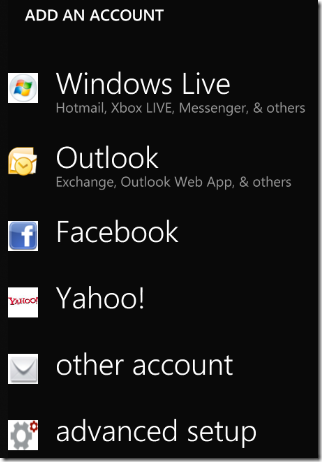
Goto “Mail Setup” in the menu:-

The “Outlook” option will only work if you have the very latest version of Exchange server, so you need to choose “advanced setup” which allows you to enter the settings manually:-
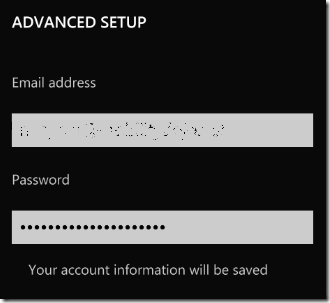
Enter your email address and password:-
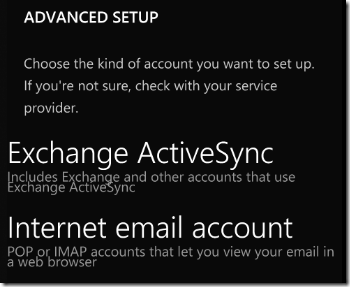
You then need to select the type of account, select, “Exchange ActiveSync”
You then need to add an account name, anything will will do for the account name “work email” perhaps.
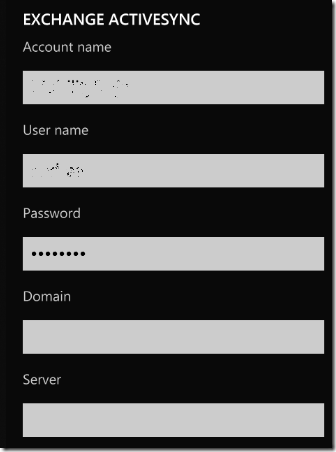
Enter your server address and domain name, then finally select the options you want on the last screen:-


I needed a batch command to delete some backup files older than 7 days earlier, here is a simple batch command to do it, should work on any version of windows, you will need to download the forefiles.exe file and put it in folder you are running that batch file from first…
To delete files older than 5 days:-
Forfiles.exe -p c:backup -s -m *.* -d -5 -c “cmd /c del /q @path”
This will delete all files in the c:backup directory older than 5 days. To test it first, use this:
Forfiles.exe -p c:backup -s -m *.* -d -5 -c “Cmd /C Echo 0x22@Path@File0x22”

Take a look at the current top 5 YouTube clips below as published by readwriteweb.com
1. Justin Bieber – Baby ft. Ludacris – 445,214,756 views
2. Lady Gaga – Bad Romance – 337,070,314 views
3. Shakira – Waka Waka (This Time for Africa) – 285,394,349 views
4. Charlie bit my finger – again! – 274,133,256 views
5. Eminem – Love The Way You Lie ft. Rihanna – 271,626,448 views

I found this and set this up on my sons Laptop this weekend, its simple to use and free, so protect you children (and yourself) from all the possibly internet nasties…
K9 Web Protection is a free Internet filter and parental control software for your home Windows or Mac computer. K9 puts YOU in control of the Internet so you can protect your kids:-

I still see people every week loosing  important data, ranging from crucial word documents to personal emails, photos and music, there is now many on-line backup services, that allow you to install a simple piece of software on your machine and backup your files to the internet, it is not really suited for large business backups, but perfect for home users to quickly setup, my favourite is SugarSync it gives you 5gb of free online storage and is simple to use.
Follow the link above, sign up now and start backing up your data!

Here is a “green” script i have written to allow you to check if PC’s on your Windows network are left on overnight, and if any are found, to force them to shutdown….
It will report on what it is doing so you can see if there are machines that are not shutting down for some reason. It is super simple to use and uses psshutdown command line tool.
All you need to do is change the “computers.txt” file to have a list of the computer names that you want to shutdown, and then run the “shutdown.bat” file to start shutting them down! This is usually done on a machine that stays on, we run it from out SBS server from a scheduled task.
Power Save/Shutdown Script File
This is provided as-is and without warranty, use at your own risk.
Please take the time to follow us on Twitter and “like” our Facebook page if you find this useful!

Microsoft Exchange Mailbox Merge tool or Exmerge.exe allows you to extract mailboxes’ data from an Exchange running computer and then merge it into same mailboxes stored on a different computer running Exchange Server. The tool copies the required data from the root server into.pst files and then merges it in the personal folders into mailboxes stored on the target server. At times, you cannot open the personal storage files after using Exmerge.exe to extract the data to another Exchange Server database. This can occur due to incompatibility issues, new format of Outlook for PST, incorrect.pst privileges or database corruption. As a result, the database becomes corrupt and you need Exchange Server Repair solution.
For example, when you try to run Exmerge.exe to move data from an Exchange Server computer to another, you may receive the below error for various users:
“Error configuring message service (MSPST MS) (MAPI_E_EXTENDED_ERROR) (CmapiSession::CreateEMSPSTProfile).
Error opening message store (MSEMS). Verify that the Microsoft Exchange Information Store service is running and that you have the correct permissions to log on. (0×8004011d).”
You cannot open the related psrsonal storage files.
Cause
The Exchange database is corrupted due to incomplete or improper merge operation. This can also occur due to insufficient pst permissions.
The database corruption can also result because of unexpected shutdown and virus issues.
Solution
You should make sure that you use the latest version of Exmerge utility and the.pst (personal storage) files are not marked as read-only. For removing the read-only attribute from.pst file, you need to click its Properties and clear the associated check box.
To restore the lost data for damaged database, you need to use your last backup. If this is absent or seems to be invalid, you need a third-party mailbox extraction tool. Termed as Exchange Repair software, these tools can repair and rebuild a corrupted Exchange database well while maintaining its integrity.
The Exchange Repair Software is highly competent to extract database mailboxes by using powerful scanning algorithms. Also, these tools are easy-to-use products with a graphically rich user interface.
Stellar Phoenix Mailbox Exchange Recoveryis an advanced and non-destructive utility that employs powerful scanning algorithms to repair a damaged Exchange Server database. It is compatible with Exchange Server 5.5, 2000 and 2003. It is a comprehensive Exchange Repair solution with impressive set of features and options. The tool extracts user mailboxes in individual.pst file format files.
Axel Culver has passion for writing Technical article. He is right now writing articles related to Product like Exchange Server Repair tool and Exchange Repair Software. He is a professional writer and has written many blogs, article, press releasing and content for many websites.
Most people have seen a fake virus infection Web page, but some may not be aware of it. They pop up on your screen and look like a perfectly normal Windows page except they tell you that your PC is infected by a virus and you need to download a program that will clean out the bug for you. The only problem is it’s a complete lie. It’s actually an attack designed to get you to download and possibly pay for some malware.
Usually these fake Windows pages are actually Web pages designed to look like a Windows system page.
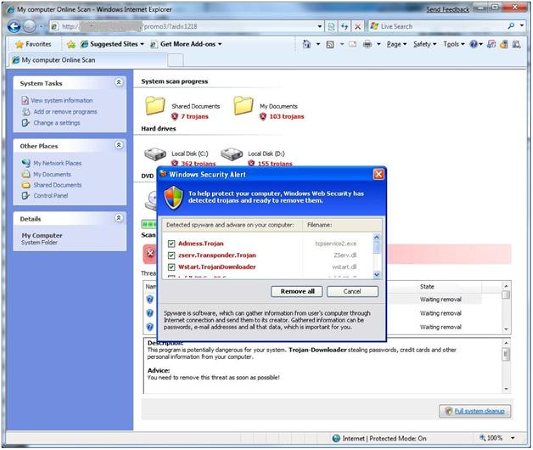
Now, not everyone would fall for this, but I can see how many people would. At a glance, it looks real, but if you look closely, you are just looking at a normal webpage.
The problems get worse when it offers you a gennuine windows pop-up box with some option, at which point you cant be sure the choices it is giving you are correct! the “No” or “Cancel” buttons may be changed for the “yes” buttons. Any click might start a malware download. Once you have one of these pages up, my advice would be to do nothing and hold in the power button on your PC to to a hard reboot, you will loose anything you have open and haven’t saved so be aware of that, but its better than infecting your PC!