Outlook Autoprompt, NK2 File, Deleting Entries

We often receive calls saying that users emails addresses are wrong, or spelt incorrectly and they keep showing up in Outlook; it usually turns out to be just the auto prompt feature of Outlook remembering an old invalid address, here is a short video on how to delete it:-

1) start typing the first few letters of the address you think is wrong

2) use the up and down keys on the keyboard to highlight the entry you want to delete

3) press the “delete” key on your keyboard…

4) DONE: you will not see that address in the list anymore!

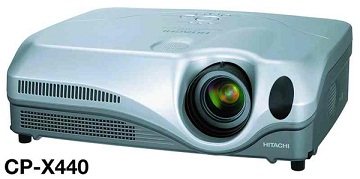
Hitachi CP-X440 Projector Reset Filter Hours

hitachi-cp-x440-filter-reset

hitachi-cp-x440-filter-resetTo reset the filter clean hours on a Hitachi CP-X440 or CP-X445, using the remote simply go to the menu, under options highlight the hour counter for the filter then press and hold the reset button on the remote for more than 3 seconds. A warning will appear then you can reset the filter timer.

Change Windows Live ID Windows 7 Phone

windows phone change live IDIf you want to change the Windows Live ID that you used to access features like Xbox LIVE, Marketplace and Zune Pass from your Windows® Phone 7, you’ll need to perform reset your phone. 

Other email accounts, including additional Windows Live accounts, and Exchange accounts can be removed without resetting your phone.

WARNING: Resetting your phone will erase all your personal content, including apps that you purchased and downloaded, and will restore the factory settings.  You may not be able to transfer purchased content to a different Windows Live ID.

If you are sure you need to change the Windows Live ID for your phone, go to Settings then to About and press “reset your phone”

Ask an Expert: Windows Server 2008

Nancy asks…

What is the Difference between Windows Server 2003 and 2008?

Hi
Iam working as Windows server 2003 Administrator and now My company is planning to migrate to Windows server 2008.
Please if possible kindly let me know the differences and merits of Windows Server 2008.

Matt NJ answers:

1)2008 is combination of vista and windows 2003r2. Some new services are introduced in it
1. RODC one new domain controller introduced in it
[Read-only Domain controllers.]
2. WDS (windows deployment services) instead of RIS in 2003 server
3. shadow copy for each and every folders
4.boot sequence is changed
5.installation is 32 bit where as 2003 it is 16 as well as 32 bit, that’s why installation of 2008 is faster
6.services are known as role in it
7. Group policy editor is a separate option in ads

2) The main difference between 2003 and 2008 is Virtualization, management.
2008 has more inbuilt components and updated third party drivers Microsoft introduces new feature with 2k8 that is Hyper-V Windows Server 2008 introduces Hyper-V (V for Virtualization) but only on 64bit versions. More and more companies are seeing this as a way of reducing hardware costs by running several ‘virtual’ servers on one physical machine. If you like this exciting technology, make sure that you buy an edition of Windows Server 2008 that includes Hyper-V, then launch the Server Manger, add Roles.

3) In Windows Server 2008, Microsoft is introducing new features and technologies, some of which were not available in Windows Server 2003 with Service Pack 1 (SP1), that will help to reduce the power consumption of server and client operating systems, minimize environmental byproducts, and increase server efficiency.
Microsoft Windows Server 2008 has been designed with energy efficiency in mind, to provide customers with ready and convenient access to a number of new power-saving features. It includes updated support for Advanced Configuration and Power Interface (ACPI) processor power management (PPM) features, including support for processor performance states (P-states) and processor idle sleep states on multiprocessor systems. These features simplify power management in Windows Server 2008 (WS08) and can be managed easily across servers and clients using Group Policies.

Ruth asks…

How can I use Windows Server 2008 to created user accounts over a home network?

I have a copy of Windows Server 2008 (not WHS) and I want to know whether I can create user acount(s) that can be accessed over our home network.

Windows Server 2008 (includes ALL versions) is a legal copy, that I got through the MSDN Alliance. Thanks for the help.

Matt NJ answers:

1. Server 2008 must be setup as a Domain Controller
2. Client computers must be capable of joining a domain
(Home versions of anything won’t work; they need to be XP Pro, Vista Business, Enterprise, or Ultimate. Unless you want to use Win98…lol)
3. Client computers then need to join the domain, using a Server 2008 administrator account.
4. Create all the user accounts you want
5. Those users should then be able to log in to any computer on your new network!

If you don’t create a domain, then user accounts on the server can still be created and used to access it’s resources, but it kinda defeats the whole purpose of having a server.

Lisa asks…

Can windows server 2008 be run on a home computer?

Can windows server 2008 be run on a home computer?

Matt NJ answers:

You can…but what are you looking to accomplish by doing so? If your looking to create a home server you just need to make sure that you have the necessary hardware.

Betty asks…

How does Windows Server 2008 R2 run 32-bit Applications?

If 32-bit processors are no longer supported by Windows Server 2008 R2, how do 32-bit applications run? Software emulation, etc.

I know they run because there is a C:Program Files(x86) Directory with some 32-bit applications installed and they work fine.

I am assuming this is the same way windows 95 supported the 16-bit applications. But I what to know specifically how this works.

Matt NJ answers:

All 64-bit versions of Windows use the WoW64 (Windows-on-Windows) subsystem to translate 32-bit applications to run on 64-bit processors.

The started with Windows 2000 Special Edition (64-bit) and continues with Windows 7.

Powered by Yahoo! Answers

Check your Backup Right Now

backup

backupI have seen a couple more people loose a load of important data this week, they just didnt have a backup at all, so if you haven’t got something setup, then do it right now, if you have something, then check it is running and is up to date right now….

Someone has just lost 10 years worth of family pictures!

Ask an Expert: Windows Mobile 7 Questions

Matt NJ

Steven asks…

how to put windows mobile on any phone?

I want to have windows mobile on my intensity phone is this possible? if not can i put the real verison of windows 7 on my phone and if i did this i couldnt call people…..i can download windows mobile but all i need to know is how to install it on my phone thanks.

Matt NJ answers:

unfortunately you cant install another OS on a phone. your best bet is to just buy a Win Mo phone. the full version of windows wont fit nor is it compatible on a phone.

although there are numerous version of windows mobile floating around ROMs some custom some stock. you still need a phone that actually runs windows mobile. and although i’m sure you could attempt to update your rom for a win mo rom i’m sure it’ll be a disaster! windows mobile phones are small computers that can ALSO make a phone call… other phones are just.. complicated phones.

Jenny asks…

Can You Upgrade Windows Mobile 6.5 To Windows Mobile 7.0 ?

I am just wondering because WM 6.5, aesthetically, was an improvement on the former look, but now with the demand surrounding WM due to the success of Android, WM has obviously stepped it up with the WM 7.0.

I am just wondering (and think this should be available, really) if you could download the WM 7.0 software when it is released, so that my phone actually changes the software via a download, and so it will feel like a new phone.

Matt NJ answers:

If WM 7.0 is supported on your phone, then you can surely do that. But if WM 7.0 is upgraded and enhanced by Microsoft to a greater extent then it will obviously require a better hardware to run. May be you can check the compatibility online before you download and then think of upgrading. In most cases the firmware on the phone corrupts in such cases when there is compatibility issue.

Mandy asks…

What is better: Iphone 4G vs. T-Mobile HTC G2 vs. T-Mobile MyTouch 4G or Windows HD7 phone?

I’m with T-Mobile now and I have the Blackberry Bold 9700. I was thinking of just buying a new phone, but I want to get the best phone out there which I can use on a GSM network.

I’m really intrigued by the Iphone 4G because I’ve heard so much good stuff about it and it looks so technologically advanced. All of my friends basically rave and rave about Android 2.2 and all that stuff. So, I do know how great the G2 and the MyTouch 4G are. I also understand that I wouldn’t be able to run my IPhone 4G at the same HSPA+ (4G) network that the G2 and MyTouch 4G run on. This is also something to consider since HSPA+ (G2 and MyTouch 4G) get insane download speeds on their Android.

When I stopped by T-Mobile, the HD7 blew me away because it’s just gorgeous…but since it just came out I really have no idea about this Windows Mobile 7 and how it’s gonna pan out.

If money wasn’t an issue, and you needed the best GSM phone right now on T-Mobile‘s network (locked, unlocked)…which would you buy:

IPhone 4G, the G2, the MyTouch4G, Windows HD7, or even the Blackberry Torch 9800?

Thanks for any input and helping me decide which phone to buy!

Matt NJ answers:

The HTC HD7 phone has to be the best option off your list.

Powered by Yahoo! Answers

Ask an Expert: VMware Download

Matt NJ

Joseph asks…

VMWARE Download?

Does anyone know if VM ware offers VM workstation for free?

Matt NJ answers:

workstation is not free.
But it offers vmware player for free. It has all the features to use already built virtual machines.

Alternatively, you can use Virtual PC for free.
http://www.microsoft.com/downloads/details.aspx?FamilyID=04d26402-3199-48a3-afa2-2dc0b40a73b6&displaylang=en

John asks…

James asks…

How can you download VMware without signing up?

I don’t want to give them my address and number!
They want my HOME address, not my email!

Matt NJ answers:

You can get the free player from here – http://www.vmware.com/download/player/download.html

It can be fooled by changing the address for any of their free versions.

Paul asks…

How, where do you download Windows Operating systems onto VMware’s Player?

I want to put Windows ME operating system on the VMware player. However, I do not have any operating disks. Is there a way to download the operating system for free off of the internet to make it run on the VMware player?

Matt NJ answers:

No sane person will upload/download a Windows ME copy!

Linda asks…

Where can i download windows in VMware ?

i need windows on my mac
i already downloaded VMware in my mac but i dont know how to run windows xp in it

Matt NJ answers:

There is a site for this at microsoft and plenty of sites just off of google. You need to buy a windows XP cd and install it in VMware just like you would on a regular PC.

Powered by Yahoo! Answers

Ask an Expert: windows 7 screenshots

Matt NJ

Sandy asks…

How do you take screenshots in windows 7?

I have an hp pavilion laptop if that changes anything..
I wanna take pictures when i video chat with my friends

Matt NJ answers:

Start, All Programs, Accessories, Snipping Tool is new with Windows 7. Try it out.

Ken asks…

How do you take screenshots with Windows 7?

And where are they saved to?

Matt NJ answers:

Press the PrtScn button on your keyboard, then open microsoft paint and click the paste button.

You are then able to save it from there.

Chris asks…

Screenshots with windows 7 aren’t working?

I’ve tried every way to take a screenshot with the keyboard (ctrl+PrtSc and then ctrl+v into paint) and just PrtSc then ctrl+v into paint.
And NOTHING comes up. At all.
I have windows 7, and I don’t know if that matters, but I’ve never had problems taking screenshots before.
Anyone know what’s going on?

Thanks.
The laptop was manufactured by Gateway, it’s an Acer, the model # is: MD7309U, and it’s a 64-bit operating system.

Not sure what you mean by it’s “make”… unless you meant “maker”, like, manufacturer or something.

Matt NJ answers:

Key functionality might be broken in the keyboard or the key might be reassigned in software to some other application, thus it won’t take screen shots.

As a workaround, try using the Snipping tool, it would be in the Start Menu quick launch pane, if not you can find it for sure under start menu > all programs > accessories.

Maria asks…

Windows 7 WoW Screenshots?

Whenever I hit print screen (take screenshot) on WoW (world of warcraft), it just takes a screenshot of what’s going on on my desktop, not WoW. When I had windows xp, it worked fine. But this was the first time I tryed it on windows 7, and it doesn’t work.

Matt NJ answers:

Its possible that WoW hasn’t fully configured its program to be compatible with Windows 7. Give it a few months and most of the bug should be fixed out.

George asks…

how to take screenshots on windows 7??

i have windows 7 n i wana take screen shots and i thought it was F8 or something but i dont know…. help? o.o

Matt NJ answers:

open start menu there is a search tab write down
sniping tool
use it to take screen shots

you can also use prtscn button which is usually placed on top of insert key or same row as F keys(f1,f2,f3) if you want you screen shot from specific window and you don’t want to crop it later when you are on that window hold down ALT key and then press prtscn and you will have screenshot just fromn that window

Powered by Yahoo! Answers

Ask an Expert: SBS 2003 2008 Server

Matt NJ

Joseph asks…

Why am I getting a partition not supported message when installing Windows SBS Server 2008?

I installed Windows SBS 2008 on a secondary hard drive (E:) than my main Vista x64 OS (C:) and am getting the following message when I boot into SBS 2008…”The operating system is installed on a drive partition that is not supported. You must install Windows SBS on the C: drive partition”. Any solutions?

Matt NJ answers:

You will need to – install SBS 2008 on the C drive and re-install Vista on the other drive 🙁

Mandy asks…

What is contained in the MSSQL$WSUS log and is it safe to delete it for clearing space on SBS Server 2003?

Path is WSUSMSSQL$WSUSLOG there’s 2 log files there each about 8 GB and they are taking up space. Should I make arrangements to get more space or is it safe to delete these ?

Matt NJ answers:

You should move the database off the C: drive – if that’s where it is.

For truncating the log, refer to http://www.wsus.info/forums/index.php?showtopic=7624
(DO NOT JUST DELETE THE FILE)

For more information on setting up the server and placement of data files, see http://www.lwcomputing.com/tips/static/bootdrivesize.asp

Powered by Yahoo! Answers

Ask an Expert: activate windows by phone

Matt NJ

Thomas asks…

Question about activating Windows XP by Phone?

I just purchased a refurbished computer so I have to reactivate windows.

However I am not connected to the internet on this computer so I need to reactivate by phone.
So when I do this, how will my computer know that it has been activated if I don’t have an internet connection?

blog answers:

Microsoft uses encryption keys to encode their software.
If you call they will ask for the numbers that are generated on the activation wizard’s window. They will then type these into their system and generate another key called a Product Key for you to enter and then it will be activated. Most of the time you can do this without talking to a human. Just follow the steps when you call.

Ruth asks…

Can you use a Windows Vista product more than once by phone verification?

I heard you can use a Windows Vista product key more then once if you activate it by phone. Is that true?

blog answers:

yes you can but you can’t have it on two computers. You use phone verification if you upgrade your computer or build a computer and want to use your paid Windows OS on the new computer.

Mandy asks…

I dont get “activate using phone” option in windows activation wizard?

I use windows vista ultimate edition.I tried to activate windows but i am not getting activate using pohone option.can u tell me the run command or the name of the file in system32 folder to get that activate using phone dialog box?please………I cannot activate by using product key

blog answers:

If you are plugged into the Internet, you won’t get the phone option ..

Turn off PC & remove the Ethernet cable – or turn off wireless in the BIOS – and then try again ..

Alternatively, why not visit the MS web site ??

Helen asks…

Is there any limitation to activate windows? or it is free to activate lifetime?

Is there limit to activate windows more than 3 or 4 time, after activating 3 or 4 time by internet do we have to bye a new product key or we can activate windows by same key with phone activation on same computer.

blog answers:

As long as you are reinstalling windows on the same machine, or installing on another machine after wiping the first one, you will be fine, it is for life. If anything goes weird, use the phone option and explain that you are reinstalling.

Powered by Yahoo! Answers